Tutoring Intake Form: Free Template (Word and PDF, 2026)

A tutoring intake form should collect what you need to teach the student and get paid, and nothing more: who the student is, how to reach the family, the goal, where things stand now, the schedule, a few permissions and the payment terms. The free template below does that in ten short sections, built for one-to-one tutors rather than schools or clinics. Download it as Word or PDF, or copy the text version on this page.
Collect the intake once, then let families book and pay from your own page. That's where TutorFluid comes in: students book from your real availability, pay upfront, and get a unique video link created automatically for each booking. It's $9.99/month after a 45-day free trial, with 0% commission.
A tutoring intake form is the questionnaire a new student, or their parent or guardian, fills in before the first session, so the tutor can set goals, plan the first lesson and agree on schedule and payment terms.
Download the free template
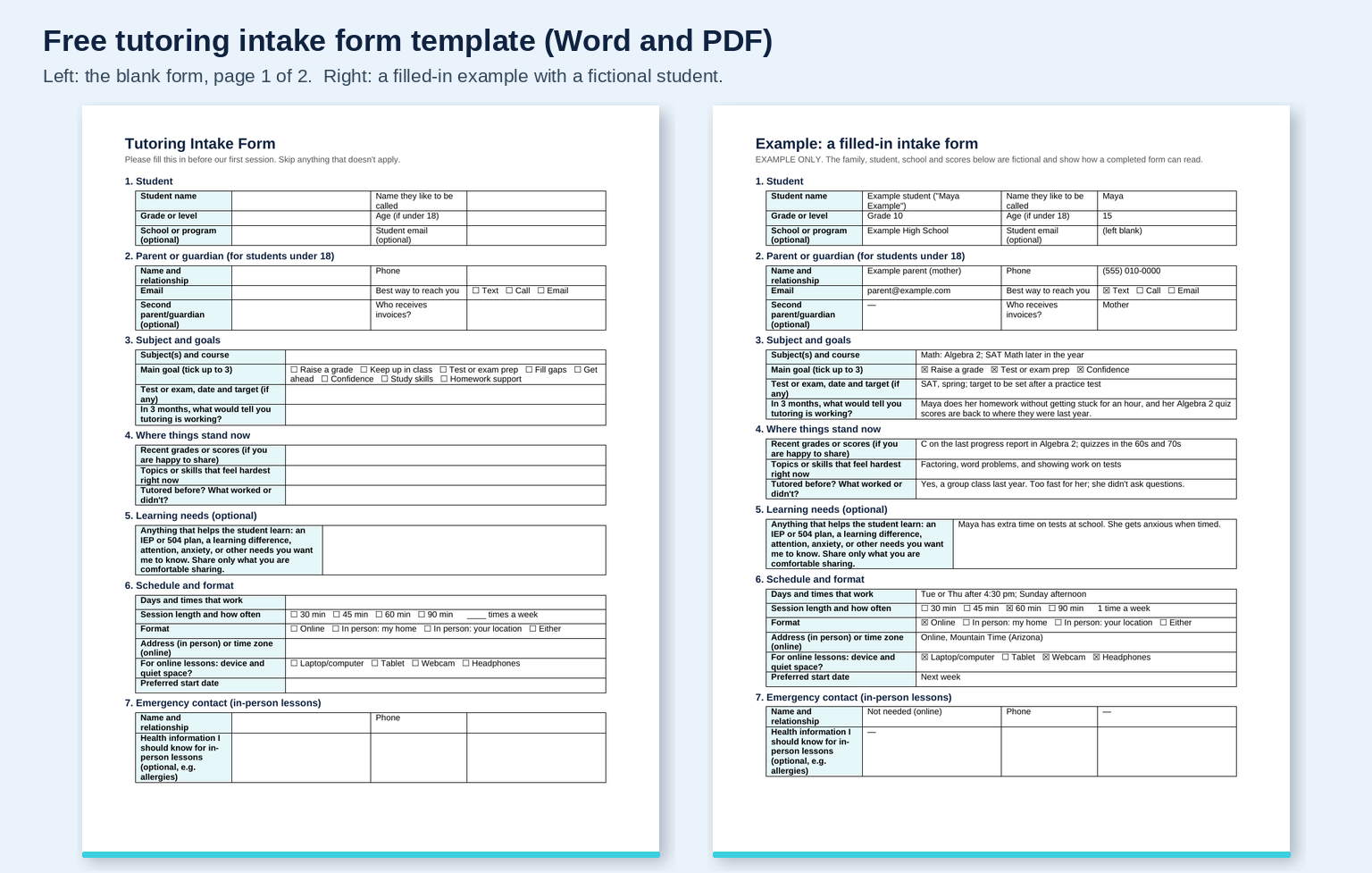
- Download the Word template (.docx). Edit it in Word, or upload it to Google Drive and open it with Google Docs.
- Download the PDF to print it or send it for families to fill in by hand.
The file has five pages: the two-page blank form (with a short tutor-only box at the end), a filled-in example, and a page of add-on questions for test prep, languages, music and adult learners, plus a 10-minute intake call agenda.
What goes on a tutoring intake form
Many of the forms ranking for this search are tutor request forms: they help an agency match a student to a tutor. An independent tutor needs a little more, because you are also the one setting goals, scheduling and billing. So the form follows the first month of a tutoring relationship:
| Section | What to ask | Why it matters |
|---|---|---|
| 1. Student | Name, the name they go by, grade or level, age if under 18, school (optional) | Tells you which curriculum and level to plan for |
| 2. Parent or guardian | Name, relationship, phone, email, best way to reach them, who receives invoices | For a minor, the parent is your client: they book, pay and get updates |
| 3. Subject and goals | Subject and course, up to three main goals, any test date and target, "what would tell you tutoring is working in 3 months?" | Gives you a goal in the family's own words to report against later |
| 4. Where things stand now | Recent grades or scores if they're happy to share, hardest topics, past tutoring and what worked | Your starting point, before your own baseline check in session one |
| 5. Learning needs (optional) | An IEP or 504 plan, a learning difference, anxiety or anything else they want you to know | Lets you adapt from the first lesson, on the family's terms |
| 6. Schedule and format | Days and times, session length and frequency, online or in person, address or time zone, device for online lessons | Settles logistics before you offer a slot |
| 7. Emergency contact | Name and phone, plus optional health information, for in-person lessons | Only needed when you are physically with the student |
| 8. Permissions | Contacting the student directly, recording online sessions, sharing photos of work, talking with the school | Puts the consent questions in writing once, instead of in a text thread |
| 9. Payment and policies | Lesson option and rate, when payment is due, cancellation notice, "I have read the agreement" | Makes the money conversation happen before the first lesson, not after it |
| 10. Signature | Parent/guardian (or adult student) name, signature and date | A clear record that the family agreed |
Sections 3 and 4 do the teaching work. Sections 8 and 9 do the business work most free forms skip. Payment and cancellation get a short acknowledgment here, with the full terms in your agreement. If you don't have one yet, start with our tutoring contract template.
Copy-ready text version
If you'd rather build it in Google Forms or paste it into an email, here is the same form as text:
Tutoring Intake Form
- Student: Name ______ · Goes by ______ · Grade or level ______ · Age (if under 18) ______ · School (optional) ______
- Parent or guardian: Name and relationship ______ · Phone ______ · Email ______ · Best way to reach you: Text / Call / Email · Who receives invoices? ______
- Subject and goals: Subject and course ______ · Main goals (up to 3): Raise a grade / Keep up in class / Test or exam prep / Fill gaps / Get ahead / Confidence / Study skills / Homework support · Test, date and target (if any) ______ · In 3 months, what would tell you tutoring is working? ______
- Where things stand now: Recent grades or scores (if you're happy to share) ______ · Hardest topics right now ______ · Tutored before? What worked or didn't? ______
- Learning needs (optional): Anything that helps the student learn, such as an IEP or 504 plan, a learning difference or anxiety. Share only what you're comfortable sharing. ______
- Schedule and format: Days and times ______ · Length: 30 / 45 / 60 / 90 min, ___ times a week · Online / In person (my home or your location) · Address or time zone ______ · For online lessons: laptop, tablet, webcam, headphones? · Start date ______
- Emergency contact (in-person lessons): Name and relationship ______ · Phone ______ · Health information I should know (optional) ______
- Permissions (yes/no): I may contact the student directly about lessons · Online sessions may be recorded for the student to review · I may share photos of the student's work in progress updates · I may talk with the student's teacher or school about goals
- Payment and policies: Single lesson / Package of ___ lessons / Monthly plan · Rate ______ · Payment is due before each lesson or package starts · Please give ___ hours' notice to reschedule · I have read the tutoring agreement and cancellation policy ☐
- Signature: Parent/guardian (or adult student) name ______ · Signature ______ · Date ______
What to leave off
A short form gets filled in. A long one sits in an inbox. The test for every question is the one the UK's data regulator puts in its data minimisation principle: personal data should be "adequate," "relevant," and "limited to what is necessary – you do not hold more than you need for that purpose" (ICO, data minimisation). That is good practice wherever you teach.
In practice, that means:
- No ID numbers. You don't need a Social Security number, a passport number or a full date of birth to tutor algebra. Grade and age are enough.
- No full medical history. Ask for health information only for in-person lessons, keep it optional, and let the family decide what to share.
- Ask the parent, not the child. For students under 18, a parent or guardian should fill in and sign the form. That also matters online. In the US, the Children's Online Privacy Protection Rule covers personal information collected online from a "child," defined as "an individual under the age of 13" (16 CFR 312.2). Operators it covers must get "verifiable parental consent" before collecting it (16 CFR 312.3). Sending the form to the parent keeps you clear of collecting from the child at all.
- School records stay with the school. FERPA's regulations apply to schools and agencies "to which funds have been made available" under Department of Education programs (34 CFR 99.1), which doesn't describe most private tutors. If a family shares a report card or an IEP, treat it as confidential anyway, and keep only what you'll use.
This is general guidance, not legal advice. Rules on collecting and storing children's data differ by country and state, so check the ones where you teach.
How this form compares with the templates on page one
We read the free templates that rank for "tutoring intake form" and "tutor intake form" on November 21, 2026. They're good at what they're built for, mostly matching a student to a tutor. Here is what each asks, according to its own page:
| Template | What it asks | Built for |
|---|---|---|
| TutorFluid intake form (this page) | Student, parent or guardian contacts, goals in the family's words, current level, optional learning needs, schedule and format, emergency contact, permissions, payment and cancellation acknowledgment, signature; plus a filled-in example and add-ons for test prep, languages, music and adult learners | One-to-one tutors who set goals, schedule and bill themselves; free Word and PDF |
| WPForms tutor request form | Student name, email and phone, grade, subjects, online or in-person preference, preferred tutor gender, available days and times, comments | Matching requests on a WordPress site; uses WPForms Pro features |
| Typeform tutor request form | Subject and level, goals and current struggles, format and availability, budget or session frequency, student and parent contact | Matching a student to the right tutor, with follow-up questions by subject |
| Growform tutoring intake form | Grade, subject, how often, format, notes, then contact details; the page suggests adding a consent or payment step for registration | A six-step lead form for tutoring businesses |
| Tutoryly onboarding checklist | Basic information, academic background (including IEP or 504 plans), a learning-style check, and ranked goals | Tutoring centers planning an onboarding flow and first assessment |
The gap is the business half. A request form gets you a lead. An intake form should also get you a signed yes on permissions, payment timing and cancellations, so the first lesson starts on agreed terms.
Add-on questions by type of student
The ten sections fit almost any student. Page 5 of the download adds a short block for each of these:
- Test prep (SAT, ACT, AP, state tests): which test and when, the most recent official or full practice-test score, the target and why that number, and any approved testing accommodations. For pricing context, see our SAT tutor cost guide.
- Language lessons: languages spoken at home, current level if known (a school level or a CEFR level such as A2 or B1), the main goal, and which of speaking, listening, reading or writing matters most.
- Music lessons: the instrument and whether there is one at home, years played, current pieces, whether they read music, and any exam, audition or performance date.
- Adult learners: the goal and deadline, practice time each week, and past study. Delete the parent and emergency-contact sections.
How to run your intake
- Send the form before session one. Email the PDF or a Google Forms version as soon as a family says yes. If you build it in Google Forms, note that a file-upload question requires responders "to sign in to a Google Account" (Google Docs Editors Help), so ask for report cards by email instead if you want the form open to everyone.
- Hold a 10-minute intake call. Confirm the goal in their words, ask about one recent example of the hardest topic, agree on one 3-month goal and how you'll measure it, then confirm schedule and terms. The agenda is on page 5.
- Store it privately. One folder per student, not a group chat, and delete it when you stop working together.
- Use it. The goal from section 3 is the first row of your tutoring lesson plan template, and section 4 is the "where we started" column of the tutoring progress report template. An intake form that nobody reads again was a waste of the family's time.
How long should it be? We found no study on the right length for a tutoring intake form, so this is a recommendation: keep it to two pages, mark the optional sections, and let families skip anything that doesn't apply. The template above follows that rule.
After the intake: booking and payment in one place
The intake answers who and why. The next problem is when and how they pay, and that's where most tutors fall back on text threads, a spreadsheet of lesson times and chasing payment after each lesson. With TutorFluid, the family moves straight from the intake to a booking:
- Bookings come from your real availability, on your own page at tutorfluid.com/yourname, for single lessons, packages of 5, 10 or 20 sessions, or monthly plans.
- Families pay upfront through Stripe or PayPal, so section 9 of the form ("payment is due before each lesson") is how it actually works. You can still accept cash, Venmo or Zelle and mark lessons paid.
- A unique video link is auto-created for each booking with Zoom, Google Meet, TutorFluid Video Room or Lessonspace, and added to the confirmation. If a lesson is rescheduled, a fresh link is generated automatically.
- Parents get their own family account to book, reschedule or cancel lessons for linked children, buy credits, pay invoices and message you in a separate conversation.
- Email and SMS reminders go out for you, and your calendar syncs with Google Calendar or Outlook.
TutorFluid Solo is $9.99/month after a 45-day free trial, with 0% TutorFluid commission, and you can build your site without a card. For a team, it's $19.99/month plus $3.99 per additional tutor. Keep the intake form for the questions only the family can answer, and let TutorFluid run everything after.
The intake form rounds out our free set for tutors. Agree terms with the tutoring contract template, plan with the lesson plan template, report with the progress report template, and bill with the tutoring invoice template. Still finding students? Start with how to get tutoring clients.
FAQ
What should be on a tutoring intake form?
The student's details, parent or guardian contacts, the subject and goals, the student's current level, optional learning needs, schedule and format, an emergency contact for in-person lessons, permissions, payment and cancellation terms, and a signature. The free template above has all ten sections.
What's the difference between an intake form and a tutoring contract?
The intake form collects information about the student and family. The contract sets the terms: rates, payment timing and the cancellation policy. Most tutors send both before session one, and the intake form's payment section points to the contract. Use our tutoring contract template for the terms.
Should I use Google Forms or a PDF?
Either works. A Google Form is easier for families on a phone and puts answers in a spreadsheet. A PDF or Word file is easier to print and sign. To use Google Forms, paste the text version above into a new form at forms.google.com.
How long should a tutor intake form be?
Two pages is a sensible limit, with optional sections clearly marked. That's a recommendation, not a measured standard. We found no study on intake form length for tutoring. Cut any question you won't use in your first month.
Should a parent fill in the form for a child?
Yes, for students under 18. The parent is usually the one booking and paying, and in the US, collecting personal information online from children under 13 can trigger the COPPA Rule's parental consent requirements (16 CFR 312.3). Adult students fill in and sign it themselves.
Is this intake form template free?
Yes. Download the Word or PDF file and use it with as many students as you like. To edit it in Google Docs, upload the Word file to Google Drive and open it with Google Docs.
Ready for your next student?
Download the intake form, send it before the first session, and let the family book and pay from your own page. Start your 45-day free trial of TutorFluid. It's $9.99/month after that, with no card needed to build your site.